


Google's official WordPress plugin, Site Kit, now detects purchases, add-to-cart actions and form submissions coming from a fixed list of third-party plugins, sends those events to Google Analytics and turns them into a goals report inside the WordPress dashboard. Google Search Central publicized the feature, called Site Goals, in a LinkedIn post on September 15, 2026, eight days after Site Kit version 1.187.0 removed the feature flag that had kept it from the general user base.
In Short
Google's free WordPress plugin now notices when visitors buy something or fill in a form, and it shows those results on the website's own dashboard. This mostly affects small shops, publishers and lead-generation sites that never set up conversion tracking in Google Analytics, because the plugin now sends those events on their behalf and can pass them to Google Ads as well. The reports only appear if you connect Google Analytics and use one of the supported shop or form plugins, and the detailed per-plugin breakdowns start counting only from the day they are switched on.
What Google published
The LinkedIn post from Google Search Central is short. According to Google, Site Kit "actively fills in data gaps by detecting these key visitor actions and sending the events to Analytics for you." The post names WooCommerce, WPForms and Contact Form 7 as event sources and says the tracking requires no manual tagging. It lists three things the feature does: it records visitor actions such as completed orders and form submissions, it shapes the report around whether a site sells online or collects leads, and it shows which traffic channels and landing pages brought in visitors who went on to convert.
Three documents published by Google fill in the mechanics. The Site Goals help page describes the widgets, metrics, configuration limits and error states. A separate page covers plugin conversion tracking, the event-collection layer that Site Goals depends on. And the WordPress.org listing for the plugin, captured at version 1.188.0, gives the installed base: more than 5 million active installations, compatibility with WordPress 5.2 or higher, testing up to WordPress 7.1.2, a PHP 7.4 minimum and translations in 33 languages.
The plugin has a long history on PPC Land. Google began testing a beta of Site Kit in December 2018, when product manager Mariya Moeva described it as a way for publishers to see Google product data from the WordPress admin panel. The plugin then reached general availability in November 2019. Its dashboard has centered on traffic, search queries, page speed and ad earnings. Site Goals shifts part of that focus from where visitors come from to what they do after they arrive.
How the events get onto a site
Site Goals does not collect anything by itself. It reads events that plugin conversion tracking has already sent to Google Analytics. According to Site Kit's documentation, plugin conversion tracking, "previously known as enhanced conversion tracking," works with a limited number of plugins from the WordPress.org directory. Once switched on, Site Kit checks which supported plugins are active and "places JavaScript code on the front end of the website to facilitate the collection of additional events."
Those events are recorded in Google Analytics, Google Ads or both. The setting lives at Site Kit > Settings > Connected Services > Ads / Analytics > Edit > Plugin conversion tracking, and it is a single switch shared between the two services. Turning it on or off in the Ads module does the same in the Analytics module, according to the documentation. On the Site Goals page, Google adds that plugin conversion tracking "is typically enabled by default." The LinkedIn post's promise of tracking without manual tagging or code therefore holds from the site owner's side. The code exists, but Site Kit writes and places it.
The earlier name invites confusion. Google Ads has a separate product called enhanced conversions, which sends hashed customer details such as email addresses to improve conversion matching. Site Kit's feature is a different mechanism, which may explain the rename, although Google's documentation gives no reason for it. The old wording has not fully disappeared: the screenshot caption on the plugin conversion tracking page still reads "Editing the Ads settings for enhanced conversion tracking." The confusion matters more than it might seem, because Google itself folded enhanced conversions for web and for leads into a single toggle in June 2026, reshuffling where advertisers find the setting.
Three conditions before anything appears
The LinkedIn post states that Site Goals "is available for all WordPress sites using Site Kit with Google Analytics." The documentation sets a higher bar. The section appears on the dashboard only when three conditions are met:
- Google Analytics is connected within Site Kit.
- At least one supported plugin is active and Site Kit has detected one of five events: add_to_cart, purchase, submit_lead_form, contact or generate_lead.
- Plugin conversion tracking is enabled, or events are configured elsewhere for one of the supported plugins.
A site running Site Kit with Analytics but no supported plugin will therefore see nothing. When the conditions are met, a prompt appears. Choosing "Show me" opens a walkthrough of the feature, while "Maybe later" dismisses it.
There is a further wrinkle in Google's own engineering notes. In the public issue tracker for the plugin on GitHub, issue #13404 states that the Site Goals widget renders only when a supported event provider plugin is active, because its tabbed breakdown depends on custom data that Site Kit attaches itself. When the same events are sent by another plugin, the issue says, Site Kit cannot attach that data and the widget is not shown. The documentation's third condition, which allows for events "configured elsewhere," reads more permissively. Google addressed part of the gap in version 1.188.0, released on September 21, 2026, which added eight key metric tiles for sites that sell products. According to the issue, those tiles appear whenever a purchase event is detected, whether or not the Site Goals widget itself is rendered.
The event names are not arbitrary. generate_lead is one of the lead events Google Analytics recommends, and it sits at the top of the lead generation reports Google Analytics added in July 2025, which follow prospects through qualify_lead, working_lead, disqualify_lead and two closing events. Site Goals covers only the first step of that sequence. Qualification and closure happen in sales systems that a WordPress form plugin never sees.
Online store performance
The Online store performance widget reports on purchase and add_to_cart events. It appears for sites running WooCommerce or Easy Digital Downloads, and it can also appear for any other ecommerce plugin that fires events with the same names. Data from those unsupported plugins lands in an Other sources tab.
The widget opens with a Key action section that shows a primary conversion rate, expressed as a percentage of total sessions, alongside a raw count. Which metric appears depends on what Site Kit detects:
- When purchase events are present, the section shows Sales Rate and Total Sales.
- When add_to_cart is detected but purchase is not, it shows Add to Cart Rate and Products added to cart.
Google's documentation spends some time justifying the rate-based approach. Its argument is that a percentage normalizes for traffic swings, so a site owner can tell whether a dip in sales came from fewer visitors or from a problem converting the visitors who did arrive. The structure resembles the session key event rate that GA4 added to its acquisition reports in June 2024, defined as the share of sessions containing at least one key event.
One detail stands out. Total Sales, according to the documentation, is "the aggregate count of successfully completed purchase transactions." It is a number of orders, not a sum of money. How much does a count reveal about a store whose order values vary widely? Rather less than a revenue figure would, and none of the metrics described for the widget is presented as revenue.
Add to Cart Rate measures the share of sessions in which a visitor added at least one item to a cart. Google describes it as a signal of purchase intent before the sale completes, placing it higher in the conversion funnel than the purchase itself.
A second section, titled "How are your visitors engaging?", always shows engagement rate with a trend indicator. When both purchase and add_to_cart events exist, an additional Products added to cart tile appears there. It can be switched off and does not count against the widget's tile limit.
When both WooCommerce and Easy Digital Downloads are active, the widget can show a separate tab for each, but only once advanced data breakdown has been enabled. Before that, all purchase and add_to_cart events collected by the Analytics property are pooled together.
Lead generation performance
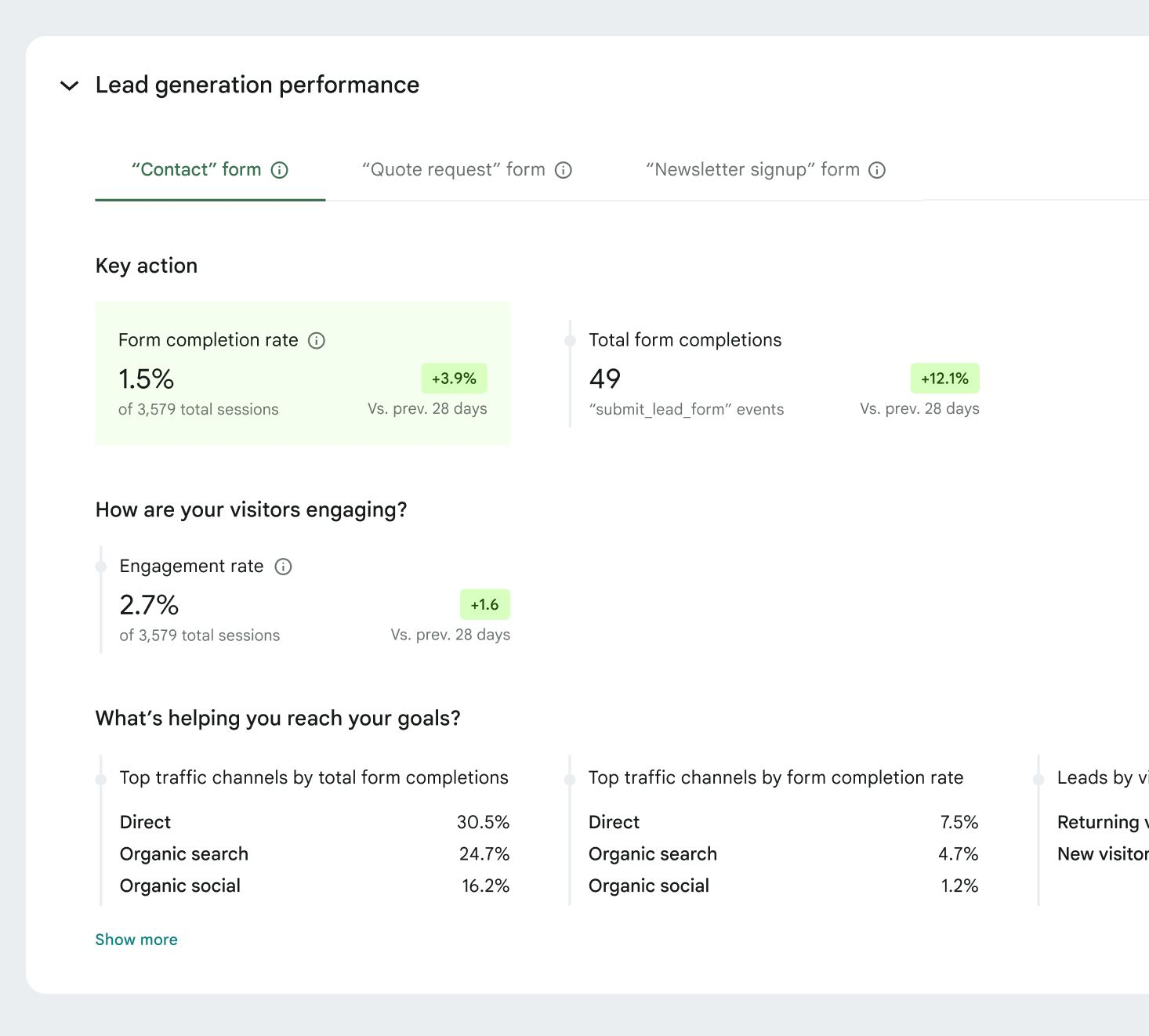
The Lead generation performance widget follows a similar pattern with fewer moving parts. Its Key action section shows a form completion rate as a share of total sessions, plus the total number of form completions. The events behind it are submit_lead_form, contact and generate_lead.
Its engagement section contains engagement rate and nothing else. Unlike the store widget, there is no secondary conversion tile. Google's documentation frames engagement rate as an indicator of visitor quality and offers one interpretation of the pairing: a high engagement rate combined with low completions "may signal a need for form optimization," according to the page.
Submissions from form plugins that are not officially supported are counted in an Other form completions tab. As with the store widget, the documentation warns that this total can include completions from supported plugins recorded before advanced data breakdown was turned on, which means the "other" figure is not a clean measure of unsupported tools.
Sixteen goal-driver panels, six on screen
The third section of each widget, headed "What's helping you reach your goals?", is where the LinkedIn post's claim about channels and landing pages lives. Each widget offers eight goal-driver panels, giving 16 in total. Site owners choose which ones appear through a Select metrics link marked with a pencil icon, and the documentation caps the display at six active tiles at a time.
For online stores, the panels cover top traffic channels by number of sales and by sales rate, sales by visitor type, top pages driving sales, sales by city, sales by country, top authors driving sales and sales by device type. The lead generation set mirrors it: channels by total form completions and by completion rate, leads by visitor type, top pages, cities, countries, top authors and device type.
The author panels are an unusual inclusion. They attribute sales or leads to the WordPress author of the content a visitor landed on, a view that suits publishers and affiliate sites more than conventional retailers.
The channel panels raise a separate question. Google Analytics added an AI Assistant channel to its Default Channel Group in May 2026, grouping visits from ChatGPT, Gemini, Claude and similar tools. Site Kit's documentation does not specify which channel grouping the Site Goals panels use, so whether AI referrals appear as their own line in a site's top channels is not something the published material settles.
Advanced data breakdown and Analytics permissions
Sites running more than one supported plugin of the same type can switch on advanced data breakdown. The setting splits results by plugin, and by individual form, into a tabbed view. It sits at Site Kit > Settings > Connected Services > Analytics > Edit, under "Advanced data breakdowns."
The feature depends on two custom dimensions in the connected Analytics property, googlesitekit_event_provider and googlesitekit_form_id. Site Kit creates them when the setting is enabled. The documentation is explicit about the trade-off: "Historical data for these granular breakdowns is not available." Until new data accumulates, the dashboard keeps showing overall totals without the split.
Four error states are documented. "Analytics update failed" appears if Site Kit cannot create any of six custom dimensions, the two above plus googlesitekit_post_date, googlesitekit_post_author, googlesitekit_post_categories and googlesitekit_post_type. "Event breakdown setup failed," "Individual form tracking setup failed" and "Sales plugin breakdown setup failed" each point to a missing dimension. In every case, Google's suggested remedy involves another person. An existing Editor or Administrator on the Analytics property can add the dimension by hand, or can raise the WordPress user's own Analytics role to Editor or Administrator so Site Kit can create it. A Retry option then reruns the step.
This is where the "no manual tagging or code" description meets an organizational limit. A WordPress administrator who holds only viewer-level access to the company's Analytics property cannot complete the breakdown setup alone. Google applies the same kind of gate elsewhere: the Task Assistant that Google Analytics added in April 2026 is open only to Administrator, Editor and Marketer roles, because it changes property settings.
The supported list
The supported list is identical across the Site Goals and plugin conversion tracking pages. Two plugins power the store widget: Easy Digital Downloads and WooCommerce. Six power the lead widget: Contact Form 7, MailChimp, Ninja Forms, OptinMonster, Popup Maker and WPForms.
Several of these are not form builders in the narrow sense. OptinMonster and Popup Maker produce pop-ups and opt-in overlays, and MailChimp's WordPress integration handles newsletter sign-ups. Commercial form builders such as Gravity Forms do not appear. Google's documentation says only that "Support for other plugins may come for future releases," without a timetable, and directs anyone who runs into problems with a listed plugin to that plugin's own support team rather than to Google.
Four months of fortnightly releases
Site Goals did not arrive in one release. The plugin's release notes on GitHub trace a build-out across ten versions shipped at two-week intervals:
- Version 1.179.0, May 18, 2026, added the Online store performance and Lead generation performance widgets, still behind a feature flag.
- Version 1.180.0, June 1, added the goal drivers section and visitor engagement metrics.
- Version 1.181.0, June 15, added the top authors goal driver, a feature tour and custom dimension setup in Analytics settings, and hid the widgets on sites without a supported plugin.
- Versions 1.182.0 through 1.186.0, between June 29 and August 24, added "gathering data" badges, feedback surveys, a "No change" badge in place of "0%" when a metric holds steady, and fixes that made OptinMonster labels and Ninja Forms titles appear in place of internal IDs.
- Version 1.187.0, September 7, removed the Site Goals feature flag and marked the feature as fully available.
- Version 1.188.0, September 21, added an event chart to the Key action sections, placed Site Goals at the top of Site Kit's email reports, added store and lead sections to its PDF reports and added the eight "Selling products" key metric tiles.
The same release notes show event collection widening beyond Site Goals. Version 1.186.0 added a "content events" provider to conversion event tracking on all sites. Version 1.187.0 added tracking for pagination clicks and embedded video. Version 1.188.0 added an outbound_link_click event, tracking for contact links and a feature flag named adsConversionTrackingIntent, which the notes do not explain. Taken together, these releases show a plugin steadily increasing the number of events it sends to Google Analytics on site owners' behalf.
The Google Ads connection
The Site Goals dashboard is the visible part of the story. Underneath it, plugin conversion tracking sends events that, according to Site Kit's documentation, "may enhance your Google Ads campaign(s)." For a small WordPress business that runs Google Ads but never configured conversions, the same plugin can now supply, once the Ads module is connected, the purchase and lead signals that automated bidding systems rely on. Google has been moving in this direction across products. At Google Marketing Live in May 2026, it presented a cluster of lead generation and measurement changes, including direct data connections to Mailchimp, ActiveCampaign and Klaviyo.
A parallel effort sits inside Google's tagging products. When Google said in May 2026 that Google Tag Manager and the Google tag would merge, it also described a visual tagging beta that lets advertisers build purchase conversions by clicking page elements, limited at the time to Google Ads. Matteo Zambon, a Tag Manager specialist, estimated in August that visual tagging handles roughly 70 to 80% of cases, the ones where tracking a purchase button is the entire requirement. The remainder, in his assessment, includes data layer design, consent integration, cross-domain tracking and reconciling Analytics with CRM records. Site Kit's approach sits at the same easy end of that range. It handles events from a short list of known plugins, on sites whose owners might otherwise have recorded nothing at all.
How those events travel also matters. Site Kit places JavaScript on the page, which means its events depend on the browser. In June 2026, Google took a different route for Shopify merchants, saying it would send Shopify purchase events into GA4 server-side through the Data Manager API from July, and industry figures cited at the time put browser-side losses at 10 to 20% of Shopify revenue. That same month Google documented a Google Ads beta that pairs website tags with CRM data to recover missed conversions. Site Kit's documentation index lists separate pages on Consent Mode and on Google tag gateway for advertisers, which routes tags through a site's own domain. Google reported an 11% signal uplift for gateway adopters when it made the tag gateway generally available in May 2025. The Site Goals pages say nothing about how consent choices or ad blockers affect the counts their widgets display.
Google is not alone in packaging conversion setup for small sites. Meta in April 2026 made a one-click, no-developer version of its Conversions API available, listing WooCommerce among supported commerce integrations and citing its own figure of 17.8% lower cost per result for advertisers who pair the API with the Pixel. That number is Meta's and has not been independently verified. The pattern across both companies is similar: measurement that once required a developer is becoming a default setting, with the platform deciding which events to collect.
The plugin's own numbers
Site Kit is free and open source. The WordPress.org listing names eight Google services it connects: Search Console, Analytics, AdSense, PageSpeed Insights, Tag Manager, Sign in with Google, Reader Revenue Manager and Ads. Google highlighted Site Kit's Reader Revenue Manager support in November 2025, describing it as a way to add newsletter sign-ups, surveys, contributions and subscriptions.
The listing shows an average rating of 4.2 out of 5. Of 1,011 ratings, 739 are five stars and 145 are one star, so roughly 14% of reviewers gave the lowest score. In the support forum, 50 of 65 issues opened over the preceding two months were marked resolved, about 77%.
For scale, WordPress ran on roughly 35% of the 13 million larger websites in the HTTP Archive dataset when PPC Land examined its stagnating market share in September 2024. Google's own Search Central documentation already pointed WordPress users to Site Kit as a single place to view Analytics and Search Console data, as PPC Land reported in February 2025. Site Goals extends that role from showing where visitors come from to counting what they do. Whether site owners treat a count of orders and form fills as enough, or as a first step toward fuller measurement, is a question the dashboard itself cannot answer.
Timeline
- December 2018: Google begins testing a beta of Site Kit for WordPress, combining Search Console, Analytics, AdSense and PageSpeed Insights.
- November 2019: Site Kit reaches general availability.
- June 2024: GA4 adds session and user key event rate metrics to its acquisition reports.
- September 2024: HTTP Archive data puts WordPress at roughly 35% of larger websites.
- February 6, 2025: Google Search Central documentation on combining Analytics and Search Console data points WordPress users to Site Kit.
- May 8, 2025: Google tag gateway for advertisers reaches general availability, with an 11% signal uplift reported by Google.
- July 2025: Google Analytics adds lead acquisition and lead loss reports built on generate_lead and related events.
- November 2025: Google highlights Site Kit's Reader Revenue Manager support.
- April 2026: Meta makes a one-click Conversions API available, with WooCommerce among supported integrations.
- April 2026: Google Analytics adds Task Assistant, restricted to Administrator, Editor and Marketer roles.
- May 13, 2026: Google Analytics adds an AI Assistant channel to the Default Channel Group.
- May 18, 2026: Site Kit 1.179.0 adds the Online store performance and Lead generation performance widgets behind a feature flag.
- May 20, 2026: Google says Google Tag Manager and the Google tag will merge, and describes a visual tagging beta.
- May 2026: Google Marketing Live presents lead generation and measurement changes.
- June 1, 2026: Site Kit 1.180.0 adds goal drivers and visitor engagement to Site Goals.
- June 15, 2026: Site Kit 1.181.0 adds the top authors goal driver, a feature tour and custom dimension setup.
- June 2026: Google says it will route Shopify purchase events into GA4 server-side from July.
- June 2026: Google Ads beta pairs website tags with CRM data to recover missed conversions.
- June 2026: Google Ads folds enhanced conversions for web and leads into a single toggle.
- August 21, 2026: Matteo Zambon estimates visual tagging covers roughly 70 to 80% of cases.
- August 24, 2026: Site Kit 1.186.0 adds a content events provider to conversion event tracking on all sites.
- September 7, 2026: Site Kit 1.187.0 removes the Site Goals feature flag.
- September 15, 2026: Google Search Central publicizes Site Goals on LinkedIn.
- September 21, 2026: Site Kit 1.188.0 adds Site Goals to email and PDF reports and adds eight "Selling products" key metric tiles.
Related PPC Land coverage
- Google testing a Site Kit for WordPress - The December 2018 beta that first combined four Google services in a WordPress plugin.
- Google relaunches a WordPress plugin - Site Kit's general availability in November 2019.
- Google Search Central integrates Analytics with Search Console data - February 2025 documentation that names Site Kit as the WordPress route to combined reporting.
- Site Kit and Reader Revenue Manager - November 2025 roundup that includes Site Kit's newsletter, contribution and subscription support.
- GA4 key event rate metrics - The session-based conversion rate that Site Goals' key action metrics resemble.
- Google Analytics lead acquisition and loss reports - The six-event lead lifecycle of which Site Goals captures only the first step.
- AI Assistant channel in Google Analytics - The May 2026 channel grouping for ChatGPT, Gemini and Claude referrals.
- Google Tag Manager and Google tag merge - Google's tagging consolidation and its no-code visual tagging beta.
- Zambon on visual tagging limits - Where no-code conversion setup stops and engineering work begins.
- Shopify purchases in GA4 - Google's server-side alternative to browser tracking for one commerce platform.
- Google Ads tags with CRM data - A beta that uses backend records to fill gaps in tag-based conversions.
- Enhanced conversions single toggle - Google Ads' consolidation of the product whose name Site Kit's feature used to share.
- Google tag gateway general availability - First-party tag routing and Google's reported 11% signal uplift.
- Meta's one-click Conversions API - Meta's no-developer server-side setup, including WooCommerce support.
- Google Analytics Task Assistant - Guided property setup restricted to roles with write access.
- Google Marketing Live 2026 lead gen changes - The May 2026 lead generation and measurement package.
- WordPress market share stagnates - HTTP Archive data on WordPress adoption among larger websites.
Summary
Who: Google, through its Site Kit plugin for WordPress and the Google Search Central team, which publicized the feature. It affects WordPress site owners, publishers, ecommerce merchants and lead generation businesses using Google Analytics alongside a supported plugin: WooCommerce, Easy Digital Downloads, Contact Form 7, MailChimp, Ninja Forms, OptinMonster, Popup Maker and WPForms.
What: A Site Goals section in the Site Kit dashboard that reads purchase, add-to-cart and lead events sent to Google Analytics by plugin conversion tracking, then reports conversion rates, counts, engagement rate and up to six goal-driver panels drawn from 16 options. An optional advanced data breakdown splits results by plugin and form using custom dimensions, with no historical data. The same events can be sent to Google Ads through a toggle shared with Analytics.
When: Site Kit 1.187.0 removed the feature flag on September 7, 2026. Google Search Central publicized Site Goals on LinkedIn on September 15, 2026, and version 1.188.0 followed on September 21, 2026 with email, PDF and key metric additions. Development ran through releases starting May 18, 2026.
Where: Inside the WordPress admin dashboard of sites running Site Kit, with data stored in the connected Google Analytics property and, where enabled, Google Ads. The plugin is distributed through WordPress.org, where it lists more than 5 million active installations.
Why: Google says the feature fills data gaps for site owners who never set up conversion tracking. For marketers, it shifts conversion collection on a large base of small WordPress sites from manual setup to a plugin default, feeding both Analytics reporting and Google Ads bidding signals, while relying on browser-side JavaScript, a fixed plugin list and Analytics permissions that limit how far the automation reaches.


Discussion