Google kills the ad load slider - AdSense banner ads get granular controls
Google AdSense replaces the ad load slider with advanced settings for banner ads on April 16, 2026, giving publishers precise control over ad count and spacing.


Google AdSense replaces the ad load slider with advanced settings for banner ads on April 16, 2026, giving publishers precise control over ad count and spacing.
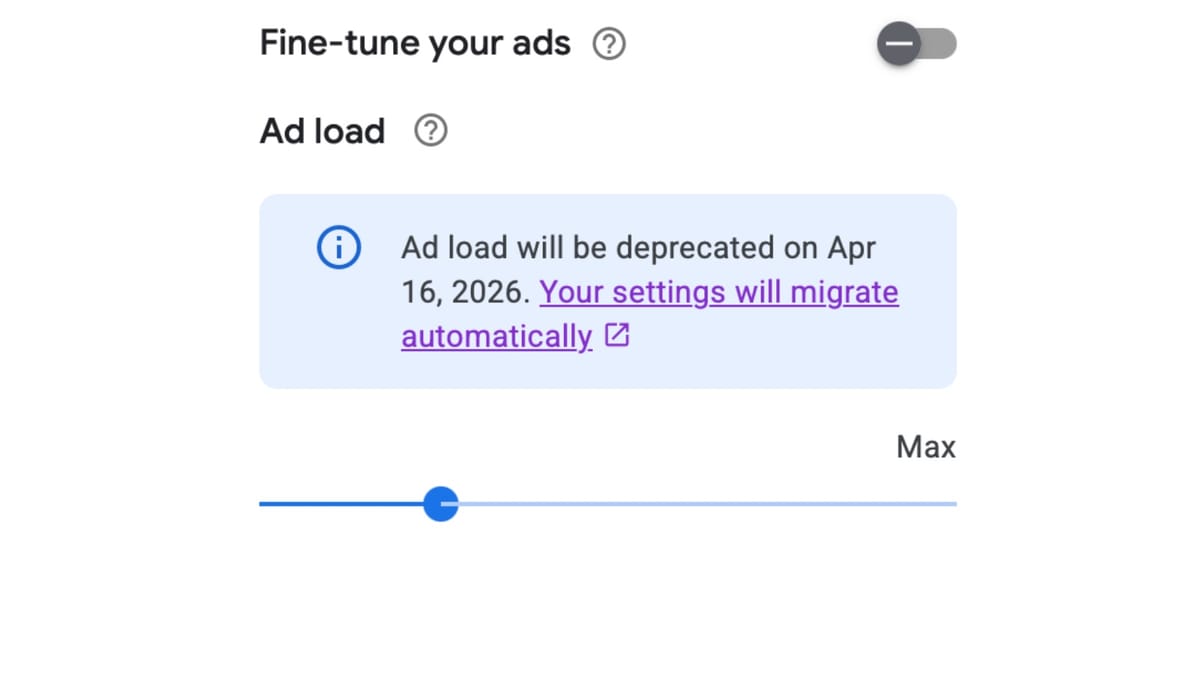
Google announced on March 11, 2026 changes to how publishers manage banner ad density within its Auto ads system, replacing a broad slider control with three distinct numerical settings that take effect on April 16, 2026. The announcement, published through the Google AdSense Help Center, marks the removal of the ad load slider - a blunt instrument that has governed in-page banner ad volume since Auto ads first launched - and its replacement with what Google is calling "advanced settings" for banner ads.
The shift is narrow in scope but meaningful in practice. Publishers who have long relied on a single slider to approximate how many banner ads appear on their pages will gain the ability to set an explicit ceiling on ad count, a defined minimum distance between placements, and a toggle for identifying additional placements specifically on article pages. Three controls replace one.
The core structural change involves two parallel moves. According to Google's announcement, the company is "removing the ad load slider in Auto ads" and simultaneously "renaming the 'fine-tune your ads' controls to the 'advanced settings' for banner ads." This rebranding is not purely cosmetic. The existing "fine-tune your ads" feature - which was introduced as a beta in January 2024 - carried its own set of granular controls, and those controls are now being elevated to become the primary mechanism for all banner ad management.
The three settings that will sit inside "advanced settings" for banner ads are:
What publishers lose is the slider itself - a control that worked by expressing ad density as a relative scale rather than as absolute values. What they gain is the ability to express preferences in concrete terms: a specific number and a specific distance, rather than a position on a spectrum from fewer to more.
Google has outlined three distinct scenarios depending on a publisher's current configuration, and the outcomes differ materially between them.
Publishers currently using the ad load slider will see their settings automatically migrated. According to the announcement, "We'll automatically migrate your ad load setting to the new 'advanced settings' for banner ads. We'll use your current ad load to approximate the number of ads and the distance between them." The word "approximate" is significant here. Google explicitly acknowledges that "since this is an approximation, there may be some discrepancies," and encourages publishers to review the translated values after launch to confirm they match expectations. The migration is automatic, but the output is not guaranteed to be numerically equivalent to the slider's implicit behavior.
Publishers already using the earlier "fine-tune your ads" controls face a cleaner transition. According to Google, their existing settings will simply transfer across to the new "advanced settings" label with no functional change. These publishers were already operating with explicit number and distance values, so no approximation is required.
The third group - publishers who do not have banner ads enabled at all - requires no action. The change affects only the controls for banner ad placements; other Auto ads formats remain unaffected by this specific update.
The launch date is April 16, 2026. Between now and that date, the existing ad load slider remains operational. According to the announcement, "Until the launch you can still use the ad load setting." After April 16, the slider disappears, and all banner ad management moves to the advanced settings interface.
This gives publishers approximately five weeks from the March 11 announcement to familiarise themselves with the new structure and plan any adjustments. Publishers relying on the slider who want to understand precisely how their settings will be translated have a narrow window to test and verify before the migration becomes permanent. After launch, Google states that "the ad load setting will be removed, and your existing settings will be applied to new 'advanced settings' for banner ads."
Auto ads, which launched in February 2018, were built on the premise of minimal publisher intervention. According to Google's documentation, the system operates by scanning page structure, detecting existing Google ads, and automatically placing new ads based on page layout, content volume, and existing ad presence. Publishers place a single piece of code across all pages, and the system handles placement decisions independently. Auto ads will also detect and respond to site changes automatically, re-analyzing pages when content or structure shifts.
The format portfolio within Auto ads spans three categories. Intent-driven formats include ad intents, which places links, anchors, and chips into existing text based on content relevance - a feature that expanded to include display ad options in May 2025. Overlay formats include anchor ads that fix to the top or bottom of the screen and are easily dismissed, vignette ads that appear as full-screen interstitials between page loads, and side rails that occupy the edges of widescreen layouts. In-page formats include banner ads within main content areas, multiplex ad grids, and related search functionality.
The history of Auto ads is, in part, a history of adding specificity to what was originally designed as a hands-off system. The fine-tune controls that PPC Land covered in January 2024 represented an earlier version of exactly this pattern - taking a broad setting (ad density) and breaking it into discrete, publisher-configurable values. The March 2026 announcement extends that logic further, absorbing the ad load slider entirely and consolidating all banner ad density management under the advanced settings umbrella.
Overlay formats have seen their own parallel evolution. Anchor ad positioning controls launched in May 2025, adding top-only, bottom-only, left-only, and right-only placement options for formats that had previously defaulted to fixed positions. Vignette ads received six new trigger conditions in February 2026, expanding when full-screen formats appear to include scroll-based activation, inactivity detection, and back-button navigation - all activating automatically for publishers on March 9, 2026, just two days before the banner ad settings announcement.
The pattern across all these updates points toward the same direction: more publisher configuration options applied to specific format categories, rather than site-wide blunt controls.
Banner ads in Auto ads are classified as in-page formats. According to Google's documentation, they "appear within the main content of your pages" and "can be display ads or native ads." Their placement is determined by page layout analysis and content volume, meaning pages with more content generally receive more banner ad placements under the automated system.
The maximum number of ads setting introduces a hard ceiling on this automated calculation. Regardless of what the system determines would be optimal, publishers can cap the total number of in-page ads appearing on any given page. The practical implication is that publishers with very long or content-rich pages - where the automated system might identify a high number of potential placements - can now limit the output to a specific figure.
Minimum distance between ads adds a spatial constraint. Rather than allowing the system to stack placements as densely as layout permits, publishers can define a minimum gap measured in distance between consecutive banner ads. This setting existed within the old "fine-tune your ads" system, but was not available through the ad load slider mechanism. Publishers who had been using the slider and want to preserve or modify spacing behavior will need to explicitly configure this value after migration.
The article page placements toggle is the most context-specific of the three. Article-format pages - typically characterized by long blocks of continuous text - present different structural opportunities than, say, a homepage or product listing page. The toggle allows Auto ads to identify and fill placements that might not surface during standard page analysis. Publishers operating content-heavy sites with long-form journalism, blog posts, or editorial content have more reason to engage with this setting than publishers running shorter-form or commerce-oriented pages.
The shift from a slider to explicit numerical inputs changes how publishers reason about ad density. A slider communicates preference on a relative scale - more or less - without specifying outcomes. A numerical ceiling communicates an absolute limit. Publishers who migrate from slider to advanced settings will, for the first time, see their density preference expressed as a specific number, which creates a new layer of accountability and comparability.
For publishers who had already been using fine-tune controls, the transition is largely administrative. The underlying functionality does not change. But the rebranding from "fine-tune your ads" to "advanced settings" may signal Google's intent to position this feature set as the standard interface for in-page ad management rather than an optional enhancement layer.
The timing also matters. This announcement comes less than two weeks after an anchor ad rendering failure on iOS that persisted from February 13 to February 18, 2026 - a six-day period during which anchor ads appeared without visible close buttons on mobile devices, inflating clickthrough rate data and prompting some publishers to disable Auto ads entirely. The iOS bug, combined with the vignette trigger expansion that also activated in the same period, has placed publisher control over Auto ads formats under heightened scrutiny. The banner ad advanced settings update arrives in this context.
Publishers managing sites across multiple verticals, or properties with widely different page structures, face the question of whether a single set of advanced settings adequately serves all their content. The Auto ads system applies settings at the site level, meaning the maximum number of ads and minimum distance values govern all pages on a given domain. A long-form investigative article and a short news brief would receive the same ceiling, even though their content volumes differ substantially.
Who: Google AdSense and all publishers currently using Auto ads with banner ads enabled, including those using the ad load slider or the existing "fine-tune your ads" controls.
What: Google is removing the ad load slider from Auto ads and replacing it with three discrete "advanced settings" for banner ads: a maximum number of in-page ads, a minimum distance between ads, and a toggle for finding additional placements on article pages. Publishers using the slider will have their settings automatically migrated via approximation; those already using fine-tune controls will see their settings carried across unchanged.
When: The announcement was published on March 11, 2026. The changes take effect on April 16, 2026. The ad load slider remains functional until that date.
Where: The change applies within the Google AdSense platform, specifically within the Auto ads settings for all publisher sites globally that have banner ads enabled.
Why: Google is replacing a relative, approximate control (the slider) with explicit numerical inputs to give publishers greater precision over banner ad count and placement spacing. The move consolidates what had been two parallel control systems - the ad load slider and the optional fine-tune controls - into a single advanced settings interface for all banner ad management.